
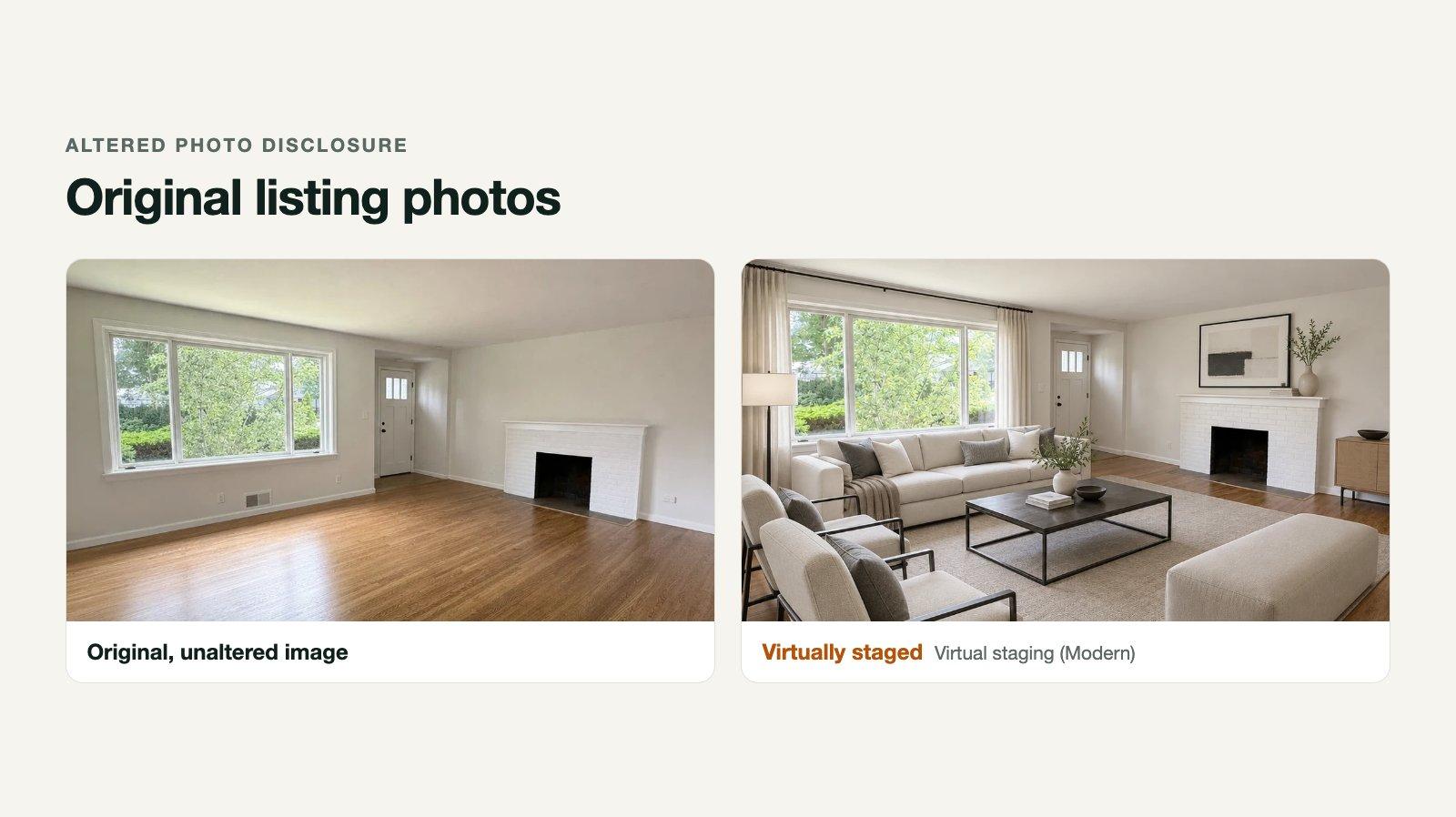
Quick answer
What AB 723 asks of a California listing
| Question | Answer |
|---|---|
| In force | January 1, 2026 (Business and Professions Code §10140.8) |
| Applies to | California real estate brokers and salespeople, and people acting on their behalf |
| Which photos | Edits that add, remove, or change something in the photo: staging, furniture removal, sky, landscaping |
| Not covered | Lighting, exposure, white balance, color correction, sharpening, straightening, cropping |
| What to add | A statement that the photo is altered, on or next to the photo |
| Plus | A link, URL, or QR code to a public page showing the original, unaltered photo |
California now treats an edited listing photo like any other claim about a home: if the edit changes what the buyer sees, you have to say so and let them see the original. That covers far more than virtual staging. Here is what the law asks, which edits it covers, and wording you can copy.
This is a plain-English summary of Assembly Bill 723 for agents, teams, and the photographers and assistants who edit for them. It is not legal advice. The law is short, so read the bill text and check with your broker before you rely on any one reading of it.
What AB 723 Requires
AB 723 was signed on October 10, 2025 and added Section 10140.8 to the Business and Professions Code. It took effect on January 1, 2026.
When an advertisement or promotional material for a property includes a digitally altered image, it must do two things:
- Say the image has been altered. The law asks for "a statement disclosing that the image has been altered." The statement must be "reasonably conspicuous and located on or adjacent to the image." A line buried in the listing remarks is not next to the photo.
- Point to the original. The ad must include "a link to a publicly accessible internet website, URL, or QR code" where the original, unaltered image can be seen, and that page must clearly identify it as the original. The statement also has to say that the unaltered images can be viewed there.
On a website you control, such as your own listing page, you can instead include the unaltered photo in the posting itself, next to the altered one.
Which Edits Count as "Digitally Altered"
The law defines a digitally altered image as one changed "through the use of photo editing software or artificial intelligence to add, remove, or change elements in the image." Its examples include fixtures, furniture, appliances, flooring, walls, paint color, landscaping, hardscape, the facade, floor plans, and things outside the property such as views, utility poles, and neighboring buildings.
It leaves out images where "only lighting, sharpening, white balance, color correction, angle, straightening, cropping, exposure" or other common adjustments are made "that do not change the representation of the real property."
In practice:
| Edit | Under AB 723 |
|---|---|
| Virtual staging | Altered: label it and link the original |
| Furniture removal | Altered: it removes elements |
| Decluttering | Altered: it removes items from the photo |
| Sky replacement, day to dusk | Treat as altered: they change what is outside the window or home |
| Lawn repair, pool water, object removal | Altered: they change landscaping or features |
| Repainting walls or changing floors | Altered: named in the law |
| Brighter lighting, exposure, white balance | Not covered, as long as the home still looks as it is |
| Straightening, perspective, cropping | Not covered |
| Sharpening or upscaling | Not covered |
The exclusion depends on the edit leaving the property looking as it really is. If a "lighting" edit turns a dark, north-facing room into a sunlit one, it is safer to label it.
Pro Tip
A correction stacked on an altered photo is still altered. If you brighten a virtually staged room, the result still needs the label.
What "Virtually Staged" Means on a Listing
"Virtually staged" means furniture and decor were added to the photo digitally. The room is empty, or furnished differently, in real life. It is the most common label on edited listings, and under AB 723 it is one form of the required statement. For edits that are not staging, such as removed furniture or a replaced sky, "Digitally altered" describes them more accurately.
Disclosure Wording You Can Copy
The statement has to say the photo is altered and that the original can be seen at the link. Short is fine. Put it in the photo caption, or as a label on the image where the site has no caption field.
- Staged room: "Virtually staged. Original, unaltered image: [link]"
- Other edits: "Digitally altered (furniture removed). See the original, unaltered image at [link]"
- Print flyer or sign: "Some photos are virtually staged or digitally altered. Scan for the original, unaltered images." followed by a QR code
- Listing remarks, in addition to the captions: "Some photos have been virtually staged or digitally altered. Original, unaltered images: [link]"
Many MLSs have their own label rules as well, such as a set phrase or a "virtually staged" field. Follow those too. They sit on top of the state law; they do not replace it.
⚠️ Important
No label makes a misleading photo acceptable. Hiding damage, removing a permanent feature such as a power line, or changing a room's layout can still misrepresent the property, whatever the caption says.
Where to Host the Originals
The link has to reach a public page that shows each original and makes clear it is the original. Options agents use:
- A page on your own website with each altered photo beside its original.
- A shared album that opens without a login, with the originals clearly named.
- A page made by your editing tool. In PropertyPixel, the disclosure pack publishes a page showing each altered photo beside its original, with a link and a QR code to it.
Keep the page up for as long as the ads run. A dead link fails the requirement as surely as no link.
Doing It in PropertyPixel
PropertyPixel's disclosure pack is off by default and is turned on per project, so it only affects listings that need it. When it is on:
- A public page shows each altered photo beside its original, labeled "Virtually staged" or "Digitally altered."
- ZIP downloads add the originals, a QR code for the page, and a label sheet listing which photos need a label, with caption text ready to paste.
- Lighting, straightening, and sharpening count as corrections and get no label, matching the law's exclusion. Every other edit is labeled, including a correction made on top of a staged photo.
The step-by-step guide shows where to turn it on.
FAQ
Is virtual staging legal in California?
Yes. AB 723 does not ban virtual staging or any other edit. It requires a statement that the photo is altered, on or next to it, and a way to see the original.
Do I need to label a photo where I only fixed the lighting?
Not under AB 723, as long as the edit does not change how the property is represented. Lighting, exposure, white balance, color correction, sharpening, straightening, and cropping are excluded.
Is a note in the listing remarks enough?
Not on its own. The statement must be "on or adjacent to the image." A note in the remarks is a good addition, but each altered photo still needs its own label.
Does it apply to social media posts and flyers?
The law covers advertising and promotional material, so treat social posts, flyers, and postcards that show an altered photo the same way. Use a short link or a QR code where there is no room for a full URL.
Does AB 723 apply outside California?
No. Other states and many MLSs have their own rules for staged or edited photos, so check the rules for each listing.
Sources
- AB 723 bill text and history, California Legislative Information (checked November 2026)
- Assembly Privacy and Consumer Protection Committee analysis of AB 723 (March 2025; covers an earlier draft, so quote the enacted text above instead)
Label Altered Photos and Share the Originals
Turn on the disclosure pack for a California listing. PropertyPixel publishes the originals page, adds a QR code, and tells you which photos need a label.
No card required · Free results include a watermark
Continue Reading
MLS Photo Size & Requirements 2026
Sizes, formats, rejection reasons, and MLS disclosure rules
Read articleHouse Phishing, AI Real Estate Photos & Why Guardrails Matter
Where an enhanced photo stops being honest
Read articleAI Virtual Staging: Does It Actually Look Real?
What buyers notice in staged photos, and what to check before publishing
Read articleAI Virtual Staging
14 styles, with every staged room kept beside its original
Read articleTry it on a photo from your next listing.
Brighten a room, clear clutter, or try virtual staging. Start with 500 free credits. No card required. Free results include a watermark.